Dear friends!
Not so long after our previous release we are bringing you a new version of NeoDCP Player.
We have been asked to add an option to move subtitles vertically and the possibility to manually override colors of subtitles. We weren’t sure about allowing such an intervention into the DCP projection, however our analysis has shown us that there are cinema operators who really need to display subtitles for example on the top of the screen just because they don’t have ascending seats or due to their cinema’s physical characteristics.
Thank you, Clemens and Sebastian, for the ideas, here is our contribution:
Official release notes:
NeoDCP Player v2.74 (18th May 2015)
- Added support for vertically repositioning subtitles and closed captions
- Added support for overriding colors of subtitles and closed captions
- Redesigned DCP/CPL selection dialogs
- Modified tab order of some GUI elements
- XYZ to simplified sRGB color space conversion is now default
- Updated German, Slovak and Russian translations
Each composition (CPL) of a DCP may have different output dimensions. It would make only a little sense to add the option for vertical displacement of subtitles or for overriding subtitles’ color into NeoDCP Player’s general settings. Moreover cinemas very often need to play more CPLs of different aspect ratios one after another.
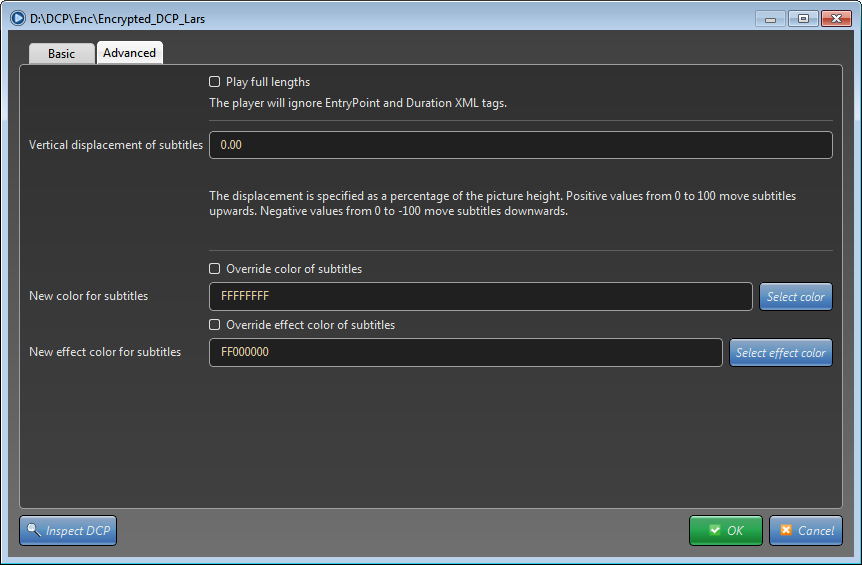
Therefore you may configure the vertical displacement of subtitles and override subtitle colors right after opening a DCP in the Advanced tab or per CPL in the Playlist editor in a similar way.
Creating NeoDCP playlist that contains CPLs with customized subtitles color and placement.
- On the File menu, select Playlist editor…
- Enter a new name for your playlist
- Click the Add. button and choose Add CPL from DCP… or Add CPL from DCP libraries…
- Select the Assetmap file of your DCP.
- Select desired composition (CPL)
- Click the Advanced tab to show subtitles color override and vertical position settings.
- Enter the Vertical displacement of subtitles value and/or select the New color for subtitles
- Click OK. New CPL will appear in the list.
- To add more CPLs repeat steps 3 – 8.
- As soon as your playlist contains the desired content click Save as… button and save your playlist into the a NeoDCP Playlist File (.NEP).
To open your newly created playlist file, go to the Files menu, select the Open playlist item and choose your NeoDCP Playlist File (.NEP).
Enjoy!
If you’re not happy tell us, if you’re happy tell others!

 Information for customers with Windows XP and Windows VistaOctober 7, 2016 - 8:35 pm
 NeoDCP Player v3.63 – added option to define color space for subtitles and moreDecember 19, 2015 - 3:53 pm
 NeoDCP Player v3.61 – added DCI P3 RGB color space and more.December 5, 2015 - 3:39 pm
 NeoDCP Player v3.60 is available. What’s new?November 29, 2015 - 3:54 pm
NeoDCP Player v2.81 release notes.
Official release notes:
NeoDCP Player v2.80 – Brightness correction per CPL/DCP now available.
Dear friends,
We have implemented a feature that has been requested by some of our customers using NeoDCP Player for 3D screening. Often it is necessary to adjust brightness of the image per each playlist item differently. Some 3D movies are uncorrected for 3D glasses, some are already corrected, and all 2D movies, trailers or advertisements need brightness correction when viewed through 3D glasses.
Official release notes:
Enjoy your NeoDCP Player!
NeoDCP Player v2.79 – Remove all expired key validities easily.
Official release notes:
Enjoy your NeoDCP Player!
NeoDCP Player v2.78 release news.
Official release notes:
NeoDCP Player v2.77 – the only software DCP player with color calibration.
NeoDCP Team proudly announces a very useful feature for everyone who owns or has access to a calibration colorimeter.
You may now utilize the wider color gamut of your display device without needing to resort to the much narrower sRGB color gamut. Also the colors may be rendered much more accurately, without more or less visible color casts that are typical for all uncalibrated displays.
Official release notes:
NeoDCP Player v2.77 (12th June 2015)
Here is the workflow:
Enjoy accurate colors!
NeoDCP Player v2.75 – Insert intermissions into CPLs
Dear friends!
There is a new version of NeoDCP Player available again. V2.75 contains a long awaited feature – Adding intermissions into DCP/CPL in Playlists. Moreover you may specify the playout range for each CPL you are opening, thus the player allows you to cut CPLs in arbitrary way, so you may, for example, watch Memento in a linear order… 🙂
Mark R., Mark T., Paulo and others, thank you all for the idea!
Official release notes:
NeoDCP Player v2.75 (21st May 2015)
Recommended workflow for 1 intermission:
That’s it.
Enjoy!
If you’re not happy tell us, if you’re happy tell others!
NeoDCP Player version 2.74 is out. Read more here.
Dear friends!
Not so long after our previous release we are bringing you a new version of NeoDCP Player.
We have been asked to add an option to move subtitles vertically and the possibility to manually override colors of subtitles. We weren’t sure about allowing such an intervention into the DCP projection, however our analysis has shown us that there are cinema operators who really need to display subtitles for example on the top of the screen just because they don’t have ascending seats or due to their cinema’s physical characteristics.
Thank you, Clemens and Sebastian, for the ideas, here is our contribution:
Official release notes:
NeoDCP Player v2.74 (18th May 2015)
Each composition (CPL) of a DCP may have different output dimensions. It would make only a little sense to add the option for vertical displacement of subtitles or for overriding subtitles’ color into NeoDCP Player’s general settings. Moreover cinemas very often need to play more CPLs of different aspect ratios one after another.
Therefore you may configure the vertical displacement of subtitles and override subtitle colors right after opening a DCP in the Advanced tab or per CPL in the Playlist editor in a similar way.
Creating NeoDCP playlist that contains CPLs with customized subtitles color and placement.
To open your newly created playlist file, go to the Files menu, select the Open playlist item and choose your NeoDCP Playlist File (.NEP).
Enjoy!
If you’re not happy tell us, if you’re happy tell others!
NeoDCP Player version 2.73 was released.
Dear friends and colleagues,
We have released a new version of NeoDCP Player. Several interesting improvements has been done. You may see a re-engineered user interface, we have updated the JPEG 2000 decoder and more.
Official release notes:
NeoDCP Player v2.73 (15th May 2015)
Upgrade your installations and enjoy!
Review of NeoDCP Player by Jason Bowdach from Cinetic Studios
Jason Bowdach from Cinetic Studios, professional color correction and finishing studio in Los Angeles, has published a review of NeoDCP Player.
You may read it here:
NeoDCP: The Independent Filmmakers DCP Review & Playback Solution?
Thank you, Jason!
NeoDCP Player at many famous Film Festivals worldwide
Dear friends and colleagues,
We are proud to inform you that we received official letter of reference that confirmed NeoDCP Player as very useful tool at many big film festivals worldwide for over a year.
Official statement from one of our customers.
Some of the festivals where NeoDCP Player is being used:
Thank you for your letter, Bill