
DCP quality control on a Windows PC: a checklist
How to check a DCP with NeoDCP Player before it ships or before it plays: the structure, the hashes, the picture, the sound, the subtitles, the versions and the keys.
Why check on a PC
A DCP quality control check on a Windows PC finds packaging, subtitle and sync problems while the drive is still with you. NeoDCP Player shows what is inside the package, compares every file with its packing list, and plays the DCP frame by frame, with its subtitles and all its sound channels. Venues that screen with NeoDCP Player see the DCP rendered by the same player.
Before you start
- Copy the DCP to a fast local drive, such as an SSD, and keep the original delivery untouched.
- Use a PC that plays your DCPs in real time. 4K in full resolution needs a fast processor with 12 or more cores (system requirements).
- For color-critical checks, calibrate the display with a colorimeter and import its ICC profile in the color settings.
Studio and Studio PT cover the checks of unencrypted DCPs in a window or full screen, in 2K, 4K and 3D, with the DCP asset hash check. Cinema and Cinema PT add encrypted DCPs with KDMs, DCP ingest with automatic verification, Supplemental DCPs (VF) and digital masking. With Starter you check in a window in 2K; full-screen playback, full 4K decoding and output and the hash check are add-ons.
1. Structure
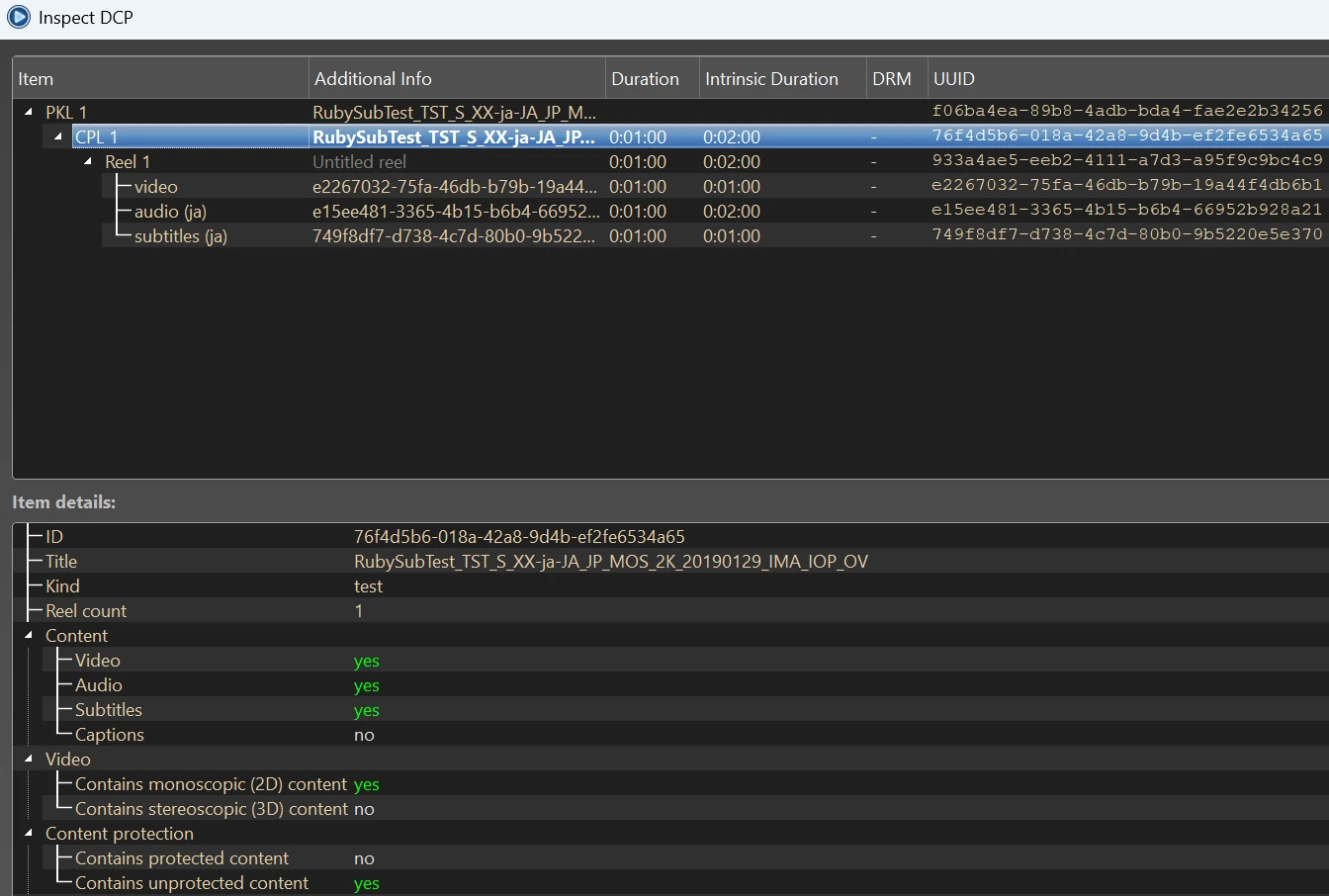
Open the DCP with File › Open DCP… and inspect it with File › Inspect DCP…. DCP inspect shows the package as a tree: packing lists (PKL), compositions (CPL), reels and their MXF files, with the title, duration, intrinsic duration, DRM status and UUID of each item. Right-click to copy a value, for example a UUID.
- The CPLs, reels and titles you expect are there.
- Durations, CPL markers, the audio channel format and the languages of the sound and subtitle tracks are right.
- The MXF details, for example the type and the average bit rate, are as mastered.
2. Hashes
The DCP hash check compares the hash of every file in the DCP with the hash in its packing list, so you know that the DCP arrived intact after copying or transport. Run File › Verify DCP Hashes… after every copy, and once more on the delivery drive before it ships. The status panel confirms the result.
With Cinema and Cinema PT, DCP ingest copies a DCP into a DCP library and checks its hashes at the same time. If an error is found, the ingest stops.

3. Picture
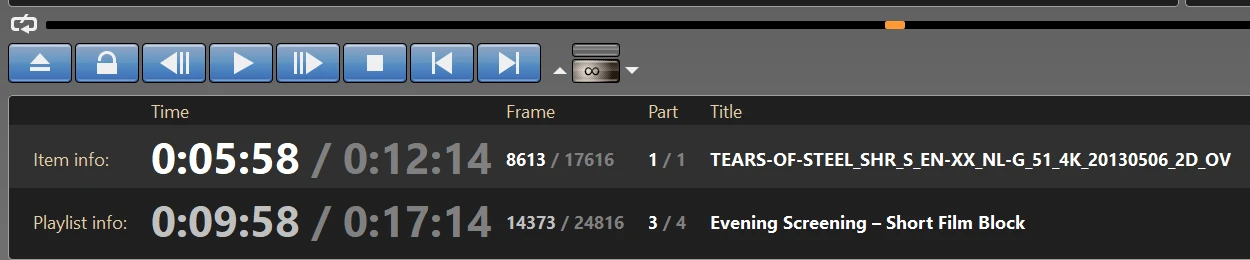
Play the DCP full screen on a calibrated display. For quality control, the controller window gives you frame-accurate control over playback:
- a seek bar that shows the reel boundaries and the CPL markers;
- a go-to menu (right-click the seek bar) that jumps to a frame number, a time, a percentage, the start of a reel or a marker;
- frame step backward and forward (Ctrl+Left, Ctrl+Right), Ctrl+Home for frame 0, and playback looping;
- an information pane with the current time, frame number, reel and title.
- The first and last frames of every reel, and each reel change.
- Frame rate, resolution and framing. Inspect DCP shows the details of the video track.
- Color on a display with its ICC profile. In full-screen mode, 30-bit output keeps gradients smooth when the graphics card, driver and display support 10-bit output.
- 3D in full-screen mode, if the DCP is stereoscopic.
On a PC that can’t decode a 4K DCP in full resolution in real time, the player decodes a lower resolution. The CPU load indicator and the resolution widget in the controller window show and set it.
4. Sound
Inspect DCP shows the audio channel format of each DCP. Play the sound through an ASIO audio interface, with each channel on its own output, or through Windows audio, and listen to every channel.
- Every channel plays from the right output, at the right level.
- Lip sync is right with the audio-to-video latency in the audio settings at 0.
- The sound continues across every reel change.
5. Subtitles and captions
NeoDCP Player renders Interop (CineCanvas) and SMPTE subtitles and captions directly from the DCP: text subtitles with their fonts, outlines or shadows, transparency and fades, PNG subtitles, open and closed captions, and Japanese and Chinese subtitles, including ruby (furigana) and vertical text.
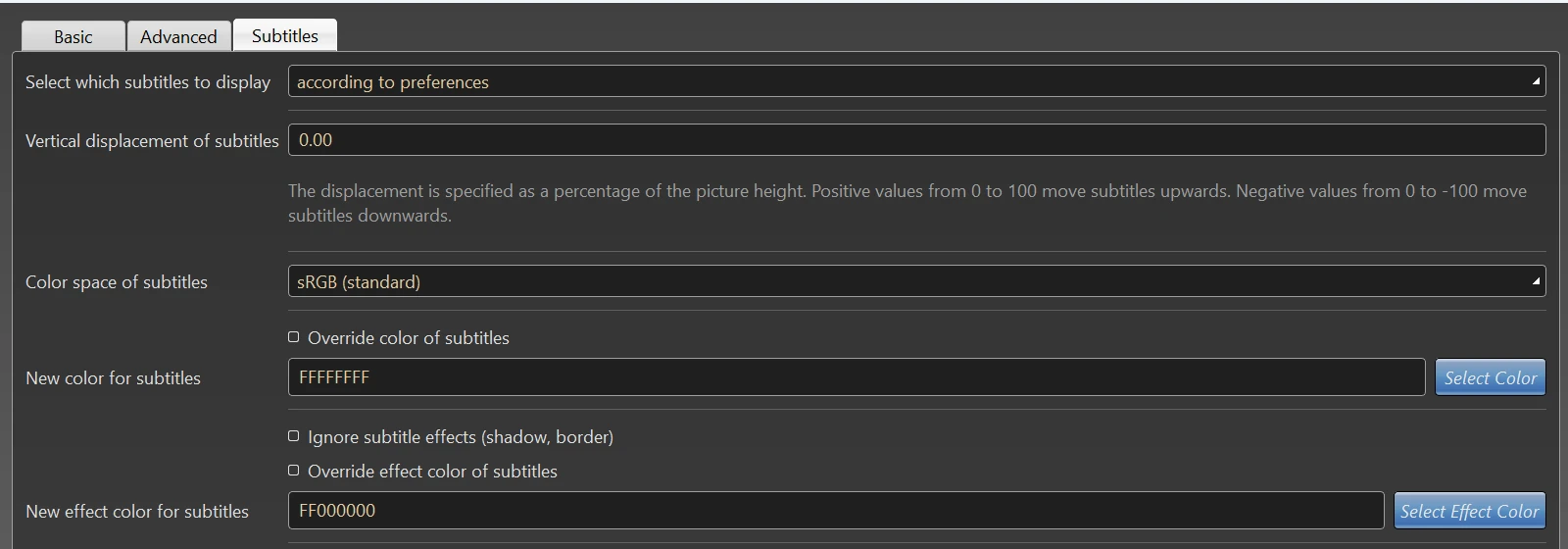
When you open the DCP, choose the track on the Subtitles tab. For quality control, use no position or color override and keep Ignore Subtitle Effects off (the default since version 5.19), so the subtitles look as mastered.
- Every subtitle and caption track that Inspect DCP lists is there and plays.
- Subtitles appear and disappear with the dialogue, also across reel changes.
- Lines stay inside the picture, and fonts and effects look as intended.
6. Versions (OV and VF)
A Supplemental DCP (VF) adds versions to an original DCP (OV), for example sound tracks or subtitles in other languages, and uses the media it shares with the OV. Ingest or register the OV in a DCP library, then open the VF. If the OV is missing, the player shows a hint, and DCP inspect marks the file references it cannot resolve. Supplemental DCPs are supported with the Cinema and Cinema PT licenses.
- The VF opens with its OV and plays its own sound and subtitle tracks.
- DCP inspect shows no file references it cannot resolve.
7. Encrypted deliverables
To test an encrypted package end to end, issue a KDM for your own NeoDCP Player’s certificate (Cinema or Cinema PT), ingest it and play the DCP over an HDCP or DPCP connection. Inspect DCP then shows the ingested keys that belong to the DCP and when they expire. Step by step: Encrypted DCPs and KDMs on a Windows PC.
8. Individual MXF files
Before packaging, check the MXF files on their own. In File › Open Audio/Video MXF…, select a picture MXF, a sound MXF and a subtitle file (MXF or XML), in any combination, and click Open. The player checks each selected file and does not open files with an invalid structure; Inspect shows more details about a file. For an encrypted MXF file, enter its 32-digit decryption key.
Record the result
Send a short QC note with the drive, so the next person knows what was checked and with what. For example:
DCP QC note
DCP and CPL:     (title, CPL UUID)
Checked with:    NeoDCP Player 5.20, (date), (name)
Structure:       OK / (notes)
Hashes:          OK / (notes)
Picture:         OK / (notes)
Sound:           OK / (notes)
Subtitles:       OK / (notes)
Versions, keys:  OK / not applicable / (notes)
Common questions
Does NeoDCP Player validate a DCP against the SMPTE or Interop specifications?
NeoDCP Player checks what it shows and plays: the structure of the package in DCP inspect, every file against its packing list in the hash check, the structure of MXF files you open on their own, and, with Cinema and Cinema PT, every DCP during ingest. It does not create a formal validation report against the specifications.
Can I check a 4K DCP on a laptop?
Yes. If the laptop can’t decode 4K in full resolution in real time, the player decodes a lower resolution, and the resolution widget shows it. For real-time playback in full 4K resolution, use a PC with the processor class in the system requirements.
Which license do I need for quality control?
Studio or Studio PT for unencrypted DCPs, with full screen, 4K, 3D and the hash check. Cinema or Cinema PT if you also check encrypted DCPs, Supplemental DCPs (VF) or ingest with verification. Studio PT and Cinema PT have no expiry date and can move to a new PC.
Can I check Japanese and Chinese subtitles?
Yes. Since version 5.18, NeoDCP Player renders Japanese and Chinese subtitles, including ruby (furigana) and vertical text, both within a single DCP and in Supplemental DCPs (OV + VF).
Next steps
For quality control of unencrypted DCPs, Studio covers full screen, 4K, 3D and the hash check. Studio PT is the same license with no expiry date.
Before you order, try the workflow on your own PC with the 14-day trial. It is for evaluation only, with limits on playback length, picture quality and subtitles, and without the hash check (trial limits). Questions about your QC setup? Ask the developer.
More step-by-step help is in the NeoDCP Player guides. The features page describes DCP inspect, the hash check and frame-accurate review, and the FAQ answers common questions.