
Supplemental DCPs: play a VF with its OV
How to play a Supplemental DCP (VF) with NeoDCP Player: create a DCP library, ingest the original version (OV), open the VF and check that its own sound and subtitle tracks play.
What a Supplemental DCP is
A Supplemental DCP (version file, VF) adds one or more versions to an original DCP (OV), for example sound tracks or subtitles in other languages. It does not contain the media it shares with the OV, so the player has to know where the OV is. That is what a DCP library is for: ingest or register the OV in a library, and the player finds its media files when you open the VF.
Supplemental DCPs are supported with the Cinema and Cinema PT licenses. Since version 5.18, Japanese and Chinese subtitles in Supplemental DCPs are rendered too.
- 1Create a libraryA folder where the player keeps DCPs.
- 2Ingest the OVCopied and hash-checked, or registered.
- 3Open the VFThe player finds the OV’s media in the library.
- 4Check the versionIts own sound and subtitle tracks play.
1. Create a DCP library
A DCP library is a folder on one of your disks where the player keeps DCPs for playback. You create it once.
- Open Library › Manage DCP Libraries….
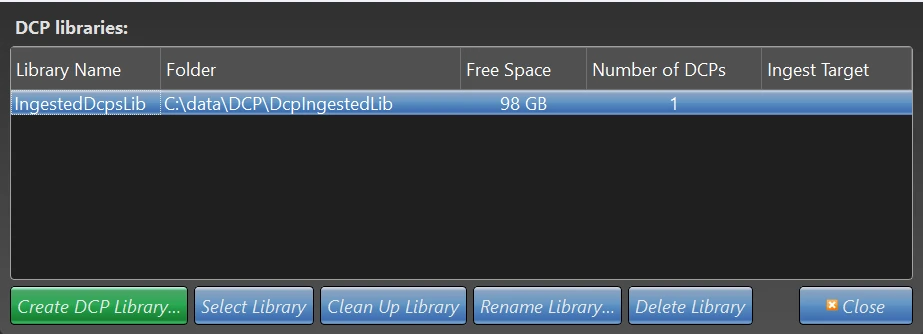
- Click Create DCP Library…, give the library a name and choose an empty folder, preferably on a separate fast drive. You can rename the library later.
- The library appears in the list with its folder, free space and number of DCPs. The Ingest Target column shows which library new DCPs are copied to.
You can create more than one library. Clean Up Library removes leftover files and references to DCPs that are no longer there.
2. Ingest the OV
- Open Library › Ingest DCPs… and choose the folder that contains the DCPs, for example on the delivery drive.
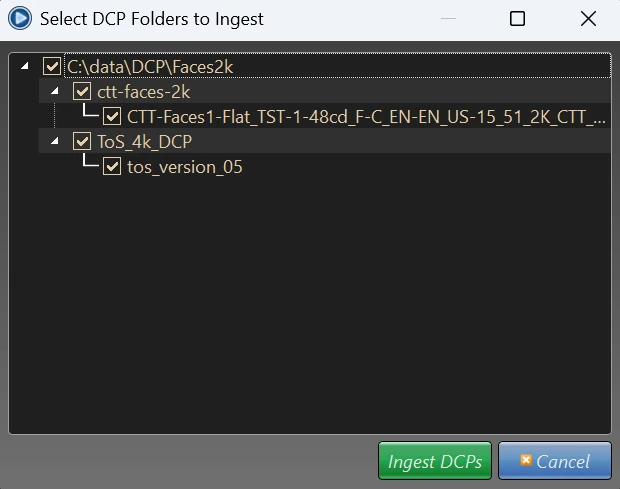
- The Select DCP Folders to Ingest dialog lists every DCP found in the folder. Tick the OV, and the VF too if you want it in the library, then click Ingest DCPs.
- The player copies the DCPs into the library and checks their hashes at the same time. If an error is found, the ingest stops.
If the OV is already on the playback disk, you can register it instead: registering adds DCPs to a library without copying them.
3. Open the VF
With the OV in a library, open the VF like any other DCP with File › Open DCP…. If you ingested the VF too, open it from the library with Library › Open Ingested DCP…, which lists ingested, registered and missing DCPs in different colors and can be sorted by title (since version 5.19).
Choose the composition (CPL) of the version you want to play. The player takes the picture and sound that the VF shares with the OV from the library.
If the OV is missing, the player shows a hint, and DCP inspect marks the file references it cannot resolve. Ingest or register the OV, then open the VF again.
4. Check the version
- The VF opens without a hint about a missing OV.
- DCP inspect (File › Inspect DCP…) shows no file references it cannot resolve, and the languages of the sound and subtitle tracks are the ones of the version.
- On the Subtitles tab when you open the DCP, the subtitle track of the version is selected.
- The version’s own sound and subtitle tracks play from the first reel to the last.
For a complete check of a delivery, see DCP quality control on a Windows PC: a checklist.
Encrypted versions
If the OV or the VF is encrypted, the player needs a KDM for the composition (CPL) you play, issued to your player’s certificate, and a protected HDCP or DPCP connection to the screen. Step by step: Encrypted DCPs and KDMs on a Windows PC.
Common questions
Do I have to ingest the VF too?
No. The OV must be in a library, ingested or registered. The VF can be opened with File › Open DCP…, or ingested too and opened from the library.
Can I play a VF with the Studio license or in the trial?
No. Supplemental DCPs and DCP ingest are part of the Cinema and Cinema PT licenses, and the 14-day trial includes neither.
Are Japanese and Chinese subtitles in a VF supported?
Yes. Since version 5.18, NeoDCP Player renders Japanese and Chinese subtitles, including ruby (furigana) and vertical text, both within a single DCP and in Supplemental DCPs (OV + VF).
Next steps
Supplemental DCPs play with the Cinema license (1 year) and the Cinema PT license (no expiry date).
Questions about versions or DCP libraries? Ask the developer.
More step-by-step help is in the NeoDCP Player guides. The features page describes DCP ingest and DCP libraries, and the FAQ answers common questions.